A failed storage system, a ransomware attack, or a regional power outage can take critical systems offline without warning. The resulting downtime interrupts business operations and customer-facing services, and any data loss that occurs after the last usable backup may be permanent.
Disaster recovery addresses this risk through advance preparation. Companies keep recovery copies of their data, a secondary environment, and documented procedures that allow IT staff to restore services in a planned order.
This guide explains what disaster recovery is and how it works, compares the main recovery strategies, and shows how to choose the right setup for each workload.
What Is Disaster Recovery (DR)?
Disaster recovery (DR) is the set of policies, tools, and procedures an organization uses to restore IT systems, applications, and data after an event that disables its primary environment. Its goal is to bring critical services back within predefined limits for downtime and data loss.
DR covers more than data. A complete recovery also requires the infrastructure that runs the workloads, the network connections between them, and the configurations that make them work together. These requirements are documented in a disaster recovery plan. While the primary environment is unavailable, workloads run from a recovery site, a secondary environment prepared for this purpose.
Why Disaster Recovery Matters
Even short outages carry costs that increase the longer systems stay offline. A tested recovery process limits these losses because IT staff know which systems to restore first and how long each restoration takes. The main reasons businesses invest in disaster recovery are:
- Limiting downtime costs. Unavailable systems stop sales, delay internal work, and can trigger penalties under customer service level agreements (SLAs). With defined recovery targets, these losses remain within limits the business has agreed to accept.
- Protecting critical data. Restoring data from copies stored separately from production systems reduces the amount of data lost permanently during an incident.
- Meeting regulatory requirements. The Health Insurance Portability and Accountability Act (HIPAA) requires covered entities and their business associates to maintain data backup and disaster recovery plans. In the EU, the Digital Operational Resilience Act (DORA) requires financial entities to maintain and test information and communication technology (ICT) response and recovery plans.
- Preserving customer trust. Repeated or prolonged outages can lead customers to switch to competitors. With a practiced recovery process, the business restores service faster and gives customers accurate restoration estimates.
Recovery capacity and testing require ongoing investment, so protecting all systems at the same level is rarely feasible. Instead, each system is assigned recovery targets based on how much it matters to the business.
Disaster Recovery vs. Business Continuity vs. Backup
Disaster recovery, business continuity, and backup all deal with disruptions, but each has a different scope and goal. The three terms are often used interchangeably, especially backup and disaster recovery. The table below summarizes the differences:
| Backup | Disaster Recovery | Business Continuity | |
| Scope | Copies of data. | IT systems, applications, data, and infrastructure. | Critical business functions, including staff, facilities, and suppliers. |
| Main Goal | Restore lost or corrupted data. | Restore IT services within set time and data loss targets. | Keep essential business functions running during and after a disruption. |
| Example | Restoring a deleted database from the previous night's copy. | Moving production workloads to a recovery site after a regional outage. | Moving staff to remote work and rerouting customer support during an office flood. |
In practice, the three overlap. Backups are one input to disaster recovery, and disaster recovery covers the IT part of a wider business continuity plan. Many companies plan business continuity and disaster recovery together under a single BCDR program.
The difference between backup and disaster recovery is important when selecting tools, since backup software alone doesn't restore servers, networks, or the dependencies between applications.
Key Disaster Recovery Concepts
A few metrics and terms define how a recovery should perform and how its success is measured. Recovery targets come from business requirements, while failover and failback describe how workloads move between environments. These concepts appear throughout disaster recovery plans and recovery tool documentation.
Recovery Time Objective (RTO)
Recovery time objective (RTO) is the maximum acceptable time between a disruption and the restoration of a service. An RTO of four hours means the service must be operational again no later than four hours after it goes down.
RTO is a target, not a measurement. The time a recovery takes, called recovery time actual (RTA), shows whether the plan and infrastructure can meet that target.
Recovery Point Objective (RPO)
Recovery point objective (RPO) is the maximum acceptable amount of data loss, measured in time. An RPO of 15 minutes means the business accepts losing up to 15 minutes of changes, requiring data copies at least that often.
A near-zero RPO requires continuous data replication, while an RPO of a day can rely on nightly backups. Shorter targets require more standby resources and more frequent data copies, and the balance between the values of RTO and RPO determines much of a recovery strategy's cost.
Failover and Failback
Failover and failback are the two directions of workload movement during a disaster. Both can run automatically or require an operator to start them, depending on the tools and the risk of acting on a false alarm. The two terms describe these operations:
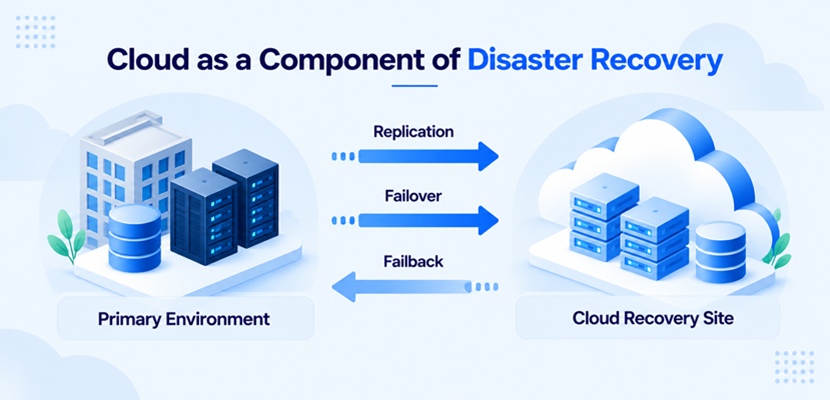
- Failover. Failover is the process of switching production workloads and traffic from the affected primary environment to the recovery site.
- Failback. Failback is the process of returning workloads to the primary environment after repairs, including synchronizing the data changes made at the recovery site.
Failback is often harder to plan than failover. Data written at the recovery site must return to the primary environment without conflicts or loss, while users continue to work.
Business Impact Analysis (BIA)
A business impact analysis (BIA) is an assessment that identifies critical business processes and estimates the consequences of their disruption over time. It documents how long each process can be down, which systems and data it depends on, and the financial, legal, and operational impact of an outage.
The BIA is the source of RTO and RPO values. It also identifies the maximum tolerable downtime (MTD), the longest outage a process can survive before the damage becomes unacceptable. Each RTO is set within that limit. Without a BIA, targets tend to be either too costly to maintain or too loose to protect critical services.
Types of Disasters DR Plans Must Cover
Disasters range from regional events that affect entire facilities to a single mistyped command. Grouping them by cause shows which threats apply to a given environment and which recovery strategy each one requires. Disaster recovery plans typically cover the following categories:
- Natural disasters. Floods, earthquakes, and wildfires can damage facilities or cut power and network connections for days. A recovery site in a different geographic region protects against events that affect a whole area.
- Infrastructure failures. Hardware faults, power outages, and network failures can disable systems without any external cause. Redundant components prevent many of these failures from becoming disasters, but not when an entire storage system or site goes offline.
- Cyberattacks. Attackers use different types of ransomware to encrypt or delete data, and distributed denial-of-service (DDoS) attacks to overload services until they stop responding. Ransomware is a particular DR concern because attackers often target backups to prevent recovery.
- Human error. Accidental deletions, misconfigurations, and faulty software updates are common causes of outages and data loss. Point-in-time backups capture data as it existed at a specific moment, making them essential for recovering from human error. Replication alone copies a mistake to the recovery site as quickly as it copies valid data.
- Insider threats. Employees or contractors with legitimate access can delete data or sabotage systems on purpose. Access reviews and activity logs help detect misuse, while recovery copies outside the insider's reach make the damage reversible.
- Third-party outages. A cloud outage, a failure at a software as a service (SaaS) provider, or a network provider problem can disrupt services the business doesn't control. The plan needs alternatives or workarounds for these dependencies, since they can't be repaired in-house.
Not every category carries the same risk for each business. A risk assessment ranks threats by likelihood and impact, and the plan's procedures are written for the highest-ranked scenarios.
Disaster Recovery Types
Recovery strategies differ in how much of the recovery environment runs before a disaster occurs. The more infrastructure remains active at the recovery site, the faster workloads resume and the more the setup costs to maintain.
Each type also corresponds to a traditional recovery site category. A cold site provides space, power, and connectivity but no ready systems; a warm site is partially equipped, and a hot site runs fully equipped systems with current data. The four common strategies range from least to most prepared:
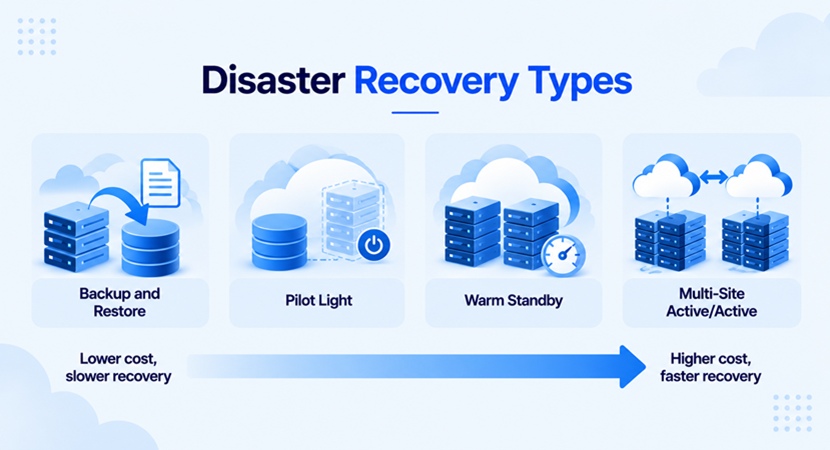
Backup and Restore
Backup and restore is the simplest strategy. Data is copied on a schedule to separate storage, and the recovery environment is built only after a disaster by provisioning infrastructure, restoring the latest backups, and redeploying applications.
This approach corresponds to a cold site. It has the lowest ongoing cost and the longest recovery time, making it suitable for systems that can tolerate hours or days of downtime. Defining the environment as infrastructure as code (IaC) shortens recovery, because the environment can be rebuilt automatically instead of manually.
Pilot Light
In a pilot light setup, the core data layer runs continuously at the recovery site. Databases and storage receive replicated data, while application servers are defined and configured but remain switched off until a failover.
During a disaster, operators start the remaining components and scale them to production capacity. Pilot light falls between a cold and a warm site. Because data stays current, pilot light achieves a much shorter RPO than backup and restore, while keeping ongoing costs low.
Warm Standby
Warm standby keeps a scaled-down but fully functional copy of the production environment running at the recovery site. Unlike pilot light, it can serve traffic immediately at reduced capacity, and recovery only requires scaling it up to full size.
This approach corresponds to a warm site. The always-on environment also simplifies testing, since operators can verify the recovery site without building it first.
Multi-Site Active/Active
In a multi-site active/active setup, the workload runs at full capacity in two or more locations simultaneously, and each site serves live traffic. When one site fails, load balancers or DNS routing send users to the remaining sites, and recovery time can approach zero. Active/active is also a common high availability pattern, since no single site is a point of failure.
Hot standby is a related option that keeps a full-capacity copy running but sends traffic to it only after a failure. Both correspond to a hot site and carry the highest cost of the four strategies. They still rely on backups to recover from data corruption, which replicates to every site.
How Disaster Recovery Works
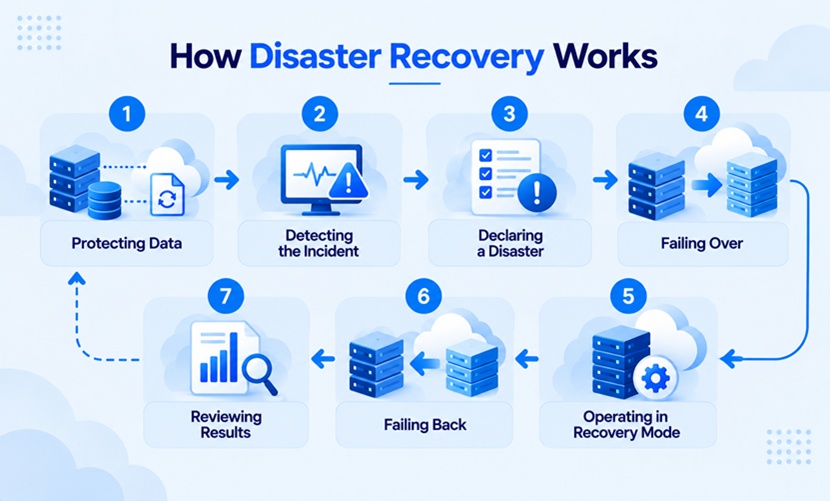
A recovery runs as a cycle that starts long before an incident and continues after services return to normal. Each phase depends on the one before it, and the last phase leads back to the first. A recovery follows these phases:
- Protecting data. Backups and replication copy data to the recovery site on a schedule that matches each system's RPO. Configurations, application code, and infrastructure definitions are copied as well, since restoring data alone doesn't recreate the environment that uses it.
- Detecting the incident. Operators receive alerts from monitoring tools that track application performance and infrastructure health. They confirm the scope and likely cause of the failure, and early detection shortens the time before recovery begins.
- Declaring a disaster. A designated decision-maker compares the expected outage with the RTO and decides whether to activate the recovery plan. This step prevents unnecessary failovers for short disruptions that end without intervention.
- Failing over. Workloads and traffic move to the recovery site according to runbooks, the documented step-by-step procedures for each system. Systems start in a predefined order, so that databases and authentication services are available before the applications that depend on them.
- Operating in recovery mode. The business runs from the recovery site, possibly at reduced capacity, while staff repair or rebuild the primary environment. Data changes made during this phase are tracked for failback.
- Failing back. Once the primary environment is stable, data written at the recovery site is synchronized back and workloads return in a controlled order.
- Reviewing results. Staff compare actual recovery times and data loss with the RTO and RPO, and update the plan and runbooks based on the results.
Many companies automate failover and failback but keep the disaster declaration a manual decision. An automatic failover triggered by a false alarm causes an outage of its own.
How to Create a Disaster Recovery Plan
A disaster recovery plan is the document that turns recovery strategies into specific actions, owners, and contacts. Staff follow it under pressure, so it must remain accurate after each significant infrastructure change. Creating a plan involves the following steps:
- Define the scope and objectives. List the systems the plan covers. Set the RTO and RPO for each one, based on the business impact analysis.
- Assign roles and contacts. Name the people who declare a disaster, perform the recovery, and communicate with customers and partners.
- Map the inventory and dependencies. Document the systems, data, and connections each service needs. Record the software dependencies between services so they can be restored in the correct order.
- Write the recovery procedures. Prepare runbooks for failover, operation at the recovery site, and failback.
- Schedule testing and maintenance. Set dates for recovery tests and plan reviews. Name the people who approve changes to the plan.
The DR plan works alongside the incident response plan. The incident response plan covers containing and investigating security incidents, while the DR plan covers restoring the affected systems.
Note: A DR plan has many components that are easy to overlook, especially in larger environments. A disaster recovery plan checklist helps verify that the plan covers each of them.
Disaster Recovery Best Practices
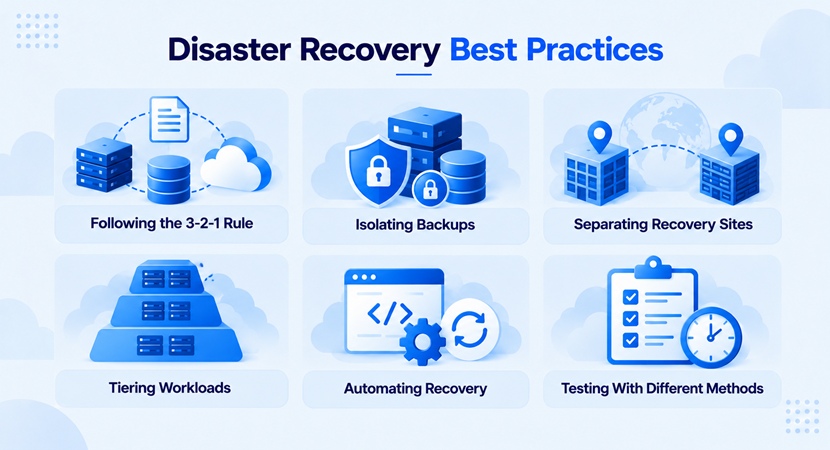
Recovery capabilities lose effectiveness over time as infrastructure changes, data grows, and staff change roles. Keeping a recovery setup aligned with the environment it protects involves the following practices:
- Following the 3-2-1 rule. The rule calls for at least three copies of data on two different storage types, with one copy stored off-site. Backing up this way reduces the risk that a single failure or local event destroys all of them.
- Isolating backups. At least one copy remains offline or immutable, meaning it can't be modified or deleted for a set retention period. Backup copies are encrypted, access to backup systems follows the principle of least privilege, and administrators sign in with multi-factor authentication (MFA) and credentials separate from production.
- Separating recovery sites. The recovery site is located far enough from the primary environment that a single regional event is unlikely to affect both. Ideally, it also has redundant power and network providers.
- Tiering workloads. Systems are grouped into tiers, such as mission-critical, business-critical, and noncritical, based on business impact. Each tier receives its own RTO and RPO values, so that spending is concentrated on the systems that need fast recovery.
- Automating recovery. Recovery environments and failover procedures are defined in templates and scripts. Automated recovery is faster and more consistent than manual work and reduces errors made under pressure.
- Testing with different methods. A complete testing program combines tabletop exercises, where staff walk through the plan in discussion, with partial failovers of individual systems and full failover tests. Each method reveals different problems, from outdated contact lists to missing dependencies.
Documentation completes these practices. Runbooks, contact lists, and network diagrams must remain accessible during an outage, including when the primary environment and its file shares are unavailable.
Disaster Recovery Challenges
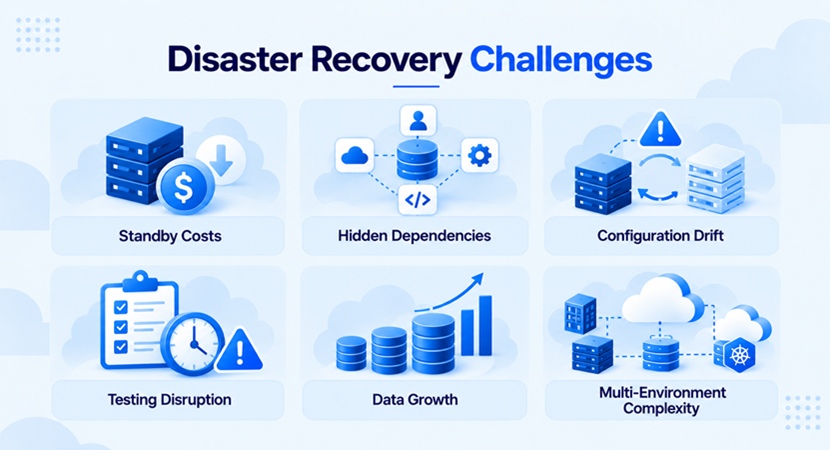
Maintaining disaster recovery is difficult because the environment it protects changes constantly. The main challenges come from cost, complexity, and the gap between a documented plan and the infrastructure it describes. The most common issues are:
- Standby costs. Recovery sites, duplicate licenses, and replication bandwidth cost money even when no disaster occurs. Under budget pressure, companies may accept longer recovery targets than the business demands.
- Hidden dependencies. Applications rely on authentication services, DNS settings, and APIs from third-party providers that aren't always documented. A recovery that restores an application but misses one of its dependencies leaves the service unavailable.
- Configuration drift. Without strict configuration management, changes to production systems don't always reach the recovery environment, and the two can drift apart over time. Drift often goes unnoticed until a failover, when the recovery site fails to start or runs outdated software.
- Testing disruption. Full failover tests can affect production performance or require maintenance windows. As a result, some companies test only parts of the plan and miss problems that appear during a complete recovery.
- Data growth. Growing data volumes lengthen backup and restore times, so a restore process that met the RTO a year ago may no longer meet it. Data deduplication shrinks backup storage but doesn't remove the need to retest restore times.
- Multi-environment complexity. Workloads spread across on-premises infrastructure and several cloud platforms each have their own backup tools, failover methods, and permissions. Coordinating recovery across multi-cloud and hybrid setups requires additional planning and specialized skills.
These challenges tend to grow gradually and remain unnoticed until a real incident. Regular testing and a plan review after each major infrastructure change will reveal them while they are still inexpensive to fix.
Note: Standby infrastructure is a recurring cost even when no disaster occurs. phoenixNAP's Bare Metal Cloud is a dedicated server with the flexibility of the cloud. Its IaC integrations let organizations provision dedicated recovery infrastructure for a test or a failover and release it afterward, with hourly billing for the time it runs.
Choosing a Disaster Recovery Solution
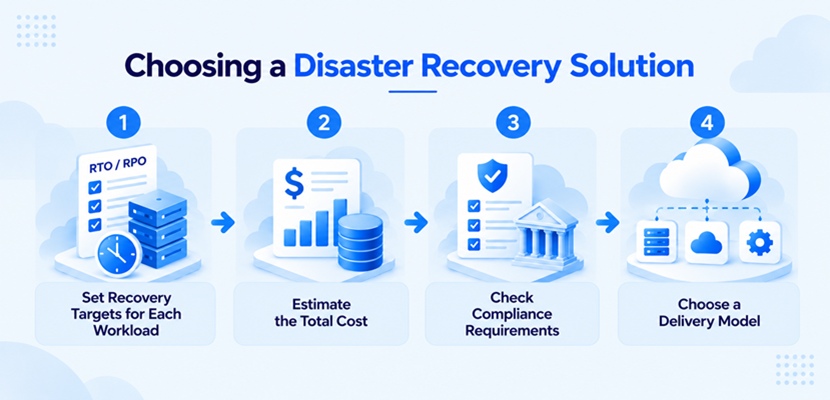
A disaster recovery solution combines a strategy, the infrastructure that runs it, and the tools or services that automate it. No single option fits every workload, and most environments combine several, for example, active/active for customer-facing services and backup and restore for internal reporting systems.
1. Set Recovery Targets for Each Workload
Take the RTO and RPO values from the business impact analysis. Group workloads by how quickly they must recover. A workload that must recover within minutes needs a recovery environment that runs continuously, such as warm standby or an active/active setup. A workload that can stay offline for a day can rely on backup and restore.
2. Estimate the Total Cost
Disaster recovery costs include standby infrastructure, storage and data transfer, and the staff time needed for testing and maintenance. A second owned data center requires a large upfront investment. Cloud computing costs, by contrast, are mostly recurring operating expenses that follow usage. Compare the total cost of each option over several years, not only the initial price.
3. Check Compliance Requirements
Regulated businesses must confirm that the recovery site meets the same security and data protection requirements as the primary environment. Data residency rules control where data may be physically stored, limiting the locations available for backups and replicas. The transfer restrictions in the General Data Protection Regulation (GDPR) are one example. These rules affect the choice of recovery region or provider. Audit frameworks such as System and Organization Controls 2 (SOC 2) may also require evidence of regular recovery testing.
4. Choose a Delivery Model
The delivery model determines who builds, runs, and tests the recovery environment. The choice depends on internal skills, the level of control required, and how much of the work the business wants to outsource. The three main models are:
- In-house DR. The company operates its own secondary site and recovery tools. This model offers full control but requires capital investment and dedicated staff.
- Self-managed cloud DR. The company uses cloud infrastructure as its recovery site and manages replication, failover, and testing itself. Costs follow usage, but the work requires cloud and automation expertise.
- Disaster recovery as a service (DRaaS). A provider delivers replication, failover orchestration (automated coordination of recovery steps), and testing support as a managed service. DRaaS reduces internal work but offers less control and creates dependence on the provider.
Some companies mix models, for example, by running critical databases in a self-managed cloud setup while a DRaaS provider protects older virtual machines.
Cloud as a Component of Disaster Recovery Strategies
Cloud infrastructure provides a recovery site without the need to own or maintain a second facility. Capacity is rented on demand, billing mostly covers the resources that run, and recovery locations can be located in regions far from the primary environment. Because cloud resources are created and configured through APIs, the whole recovery environment can be defined in code, rebuilt quickly, and tested without disrupting production.
This model, known as cloud disaster recovery, introduces different cost, resource, and operational considerations for each DR strategy.
Backup and Restore in the Cloud
Cloud object storage is a common destination for off-site backups because it charges mainly for the capacity used and keeps copies outside the primary environment. During a disaster, the recovery environment is provisioned from templates and the backups are restored into it. Between incidents, the costs come mainly from storage.
Pilot Light and Warm Standby in the Cloud
Both strategies benefit from the cloud's ability to add capacity quickly. Replicated databases run continuously at a small size, while application servers remain defined in templates for pilot light or run at minimal capacity for warm standby.
During a failover, automatic scaling or an automation script expands the environment to production size. Full capacity is billed only while the failover lasts.
Multi-Site Active/Active in the Cloud
Cloud regions make active/active designs available to companies that can't justify building several data centers. Workloads run in two or more regions, and traffic routing directs users to a healthy region. The cost remains the highest of the four strategies, since each region runs at or near full capacity.
Hybrid Disaster Recovery
A hybrid cloud approach keeps production on-premises or in a private cloud and uses a cloud recovery site only for disaster recovery. This setup keeps existing hardware in use while avoiding the cost of a second facility. It requires reliable network connectivity between the environments and recovery procedures that account for differences between the two platforms.
Note: Recovery targets, compliance rules, and budget all shape what a cloud recovery site should look like. For help planning infrastructure around those requirements, reach out to the phoenixNAP team.
Disaster Recovery FAQ
Vendors and documentation use disaster recovery terms inconsistently, which makes a few questions especially common. The short answers below cover the main recovery types, the two core recovery metrics, and how often a plan needs testing.
What Are the Main Types of Disaster Recovery?
Disaster recovery types differ in how much of the recovery environment runs before a disaster. More readiness means faster recovery and higher ongoing cost. The four main types are:
- Backup and restore. The recovery environment is built after the disaster from backups.
- Pilot light. Data is replicated continuously, and the remaining components start during failover.
- Warm standby. A scaled-down copy of production runs continuously.
- Multi-site active/active. Full copies serve traffic from several locations simultaneously.
Most environments combine several types, based on each workload's recovery targets.
What Is the Difference Between RTO and RPO?
RTO is the maximum acceptable time to restore a service after a disruption, while RPO is the maximum acceptable data loss, measured as time since the last usable copy. RTO defines how quickly systems must return, and RPO defines how much recent data the business can afford to lose.
How Often Should a DR Plan Be Tested?
A disaster recovery plan should be tested at least once a year and after any major change to the infrastructure, applications, or recovery tools. NIST SP 800-34 calls for testing or exercising federal contingency plans at least annually. DORA also requires financial entities to test their plans at least once a year. Critical systems benefit from more frequent partial tests between full exercises.
Make Disaster Recovery Part of Regular IT Operations
A well-tested disaster recovery setup turns an unpredictable outage into a planned sequence of steps with known limits on downtime and data loss. The right setup depends on each workload's recovery targets, budget, and risk, and it remains reliable only when testing follows infrastructure changes. Start with a business impact analysis of your most critical systems, and match each one to the recovery strategy that meets its RTO and RPO.